Best Ableton Live Controllers in 2026
← 7III Tap User Manual Videos Support Version History
Last Update:
A complete guide to choosing the right controller for Ableton Live.
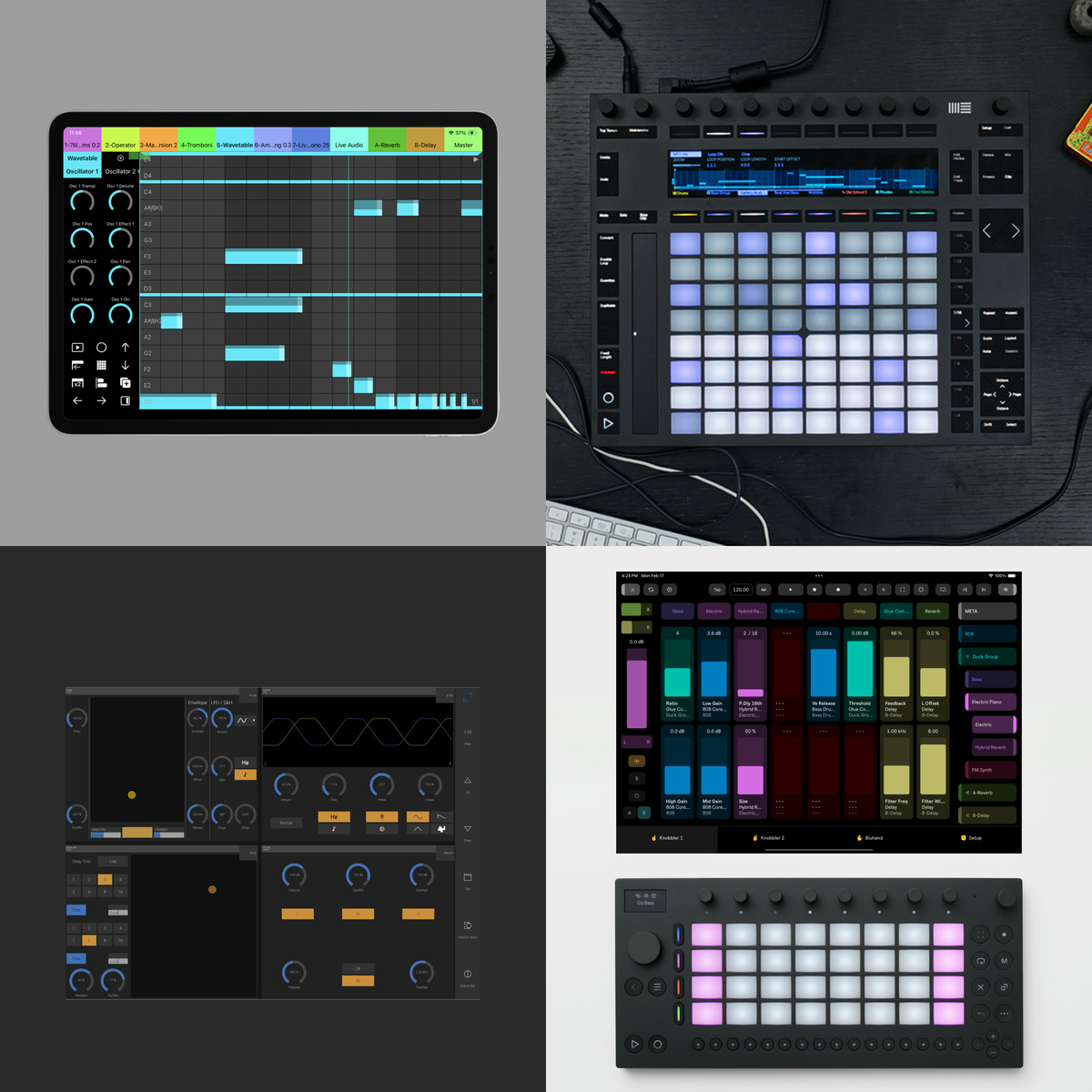
If you're looking for the best Ableton Live controller in 2026, you've probably seen dozens of options: Ableton Push 3, Ableton Move, TouchAble, LK, Knobber and new iPad/iPhone apps like 7III Tap.
This guide compares the most popular controllers so you can choose the one that fits your workflow, whether you're performing live, producing in the studio, or controlling Ableton on the road. We have only included devices that maximize Ableton Live integration, so this comparison omits devices like the Novation Launchpad, which is part of a family of more universal controllers that are missing important Ableton Live features.
One important update: Tap is not simply a touchscreen version of Push. In some Live workflows it is now more deeply integrated than Push, especially for step sequencing, automation editing, Browser and device workflows, audio clips, MPE pad expression, and quickly moving between tracks and views. Push still wins for hardware feel, expressive physical pads, and standalone operation.
Quick Overview
- Push 3 — The ultimate hardware controller
- Move — A modern and compact controller that can also make music
- TouchAble — Controller with deep integration and no active development
- Tap — A deeply integrated Ableton controller for live performance on iPhone & iPad
- Knobber — As many
knobsfaders as you could ever ask for - LK — Mobile controller that can control about anything MIDI
Comparison Table (2026)
| Controller | Push 3 | Move | TouchAble | 7III Tap | Knobber | LK |
|---|---|---|---|---|---|---|
| Price (USD) | 999 | 499 | 30 | 25 | 40 | 25 |
| Active Support | ✅ | ✅ | ❌ | ✅ | ✅ | ✅ |
| Plug in and play | ✅ | ✅ | ❌ | ✅ | ❌ | ❌ |
| Connection | USB | USB | WiFi | USB, WiFi and Bluetooth MIDI | WiFi | WiFi |
| MPE | ✅ | ❌ | ❌ | ✅ (Pressure or Slide + Pitch Bend) | ❌ | ❌ |
| Different pad layouts | ❌ | ❌ | ✅ | ✅ | ❌ | ✅ |
| Sequencing | ⭐⭐ | ⭐⭐⭐ | ⭐⭐ | ⭐⭐⭐⭐ | ❌ | ⭐⭐⭐ |
| Automation Editing | ❌ | ❌ | ✅ | ✅ | ❌ | ❌ |
| Integrated Devices | ✅ | ✅ | ✅ | ✅ | ✅ | ⭐⭐ |
| Clips Launch | ✅ | ✅ | ✅ | ✅ | ❌ | ✅ |
| Combine clips | ❌ | ❌ | ❌ | ✅ | ❌ | ❌ |
| Mixing | No faders | No faders | ✅ | ✅ | ✅ | ✅ |
| Like a Push or better | ✅ | ⭐⭐⭐ | ⭐⭐ | ⭐⭐⭐⭐⭐ | ❌ | ❌ |
| Seq modulation | ❌ | ❌ | ❌ | ✅ | ❌ | ✅ |
| Extra encoders | ❌ | ❌ | ❌ | ✅ | ✅ | ✅ |
| Devices Browser | ✅ | ✅ | ✅ | ✅ | ❌ | ❌ |
| Random Device | ❌ | ❌ | ❌ | ✅ | ❌ | ❌ |
| Audio clip editing | ✅ | ❌ | ❌ | ✅ | ❌ | ❌ |
| 16 Pitches / 64 pads | ✅ | ✅ | ❌ | ✅ | ❌ | ❌ |
| Orientations | 1 | 1 | 1 | 2 | 2 | 1 |
| Android? | - | - | ❌ | ❌ | ✅ | ✅ |
Controller Breakdown
Hardware Controllers
- Sturdy, but also heavy
- Have to use hands, not fingers
- Expensive
Push 3 — The Industry Standard
Ableton's flagship controller offers:
- deep integration
- exceptional build quality
- expressive pads with MPE
- standalone mode (optional)
Cons:
- limited customization
- heavy
- the sequencer sucks
Best for: studio musicians and producers that want hardware pads.
Website: ableton.com/en/push
Move — Grooving on the Go
A compact and modern groove box with:
- solid pads with Aftertouch
- USB connectivity
- Ableton Live in a small package
- cool groove box, perfect for sampling
Cons:
- small screen
- not the best sequencer
- limited customization
- no MPE
Best for: producers who want a hardware feel without the size of Push.
Website: ableton.com/en/move/
Touchscreen Controllers
- much cheaper than hardware if you already own an iPhone or iPad
- lack of pressure sensitivity, aftertouch etc. -> if you are a piano nerd or finger drumming expert you might want to use extra hardware pads or a keyboard.
TouchAble — Deep Integration without Support
TouchAble is a deeply integrated and powerful controller on iPad:
- Control almost anything in Ableton Live
Cons:
- no updates
- UI looks pretty bad
- not very performance-focused
- expensive for a mobile app
- needs a server to connect
Website: zerodebug.com
Tap — Max Performance App
Tap is the controller in this comparison that most clearly goes beyond the usual Push-like workflow:
- Best in class step sequencer, no matter if you make a crazy beat or add beautiful harmonies, with amazing tools and creative MIDI modulations.
- Flin, a clip-backed generative sequencer with 16 independent polymetric note streams, plus Companion and the Rhythm Generator.
- Automation Editing, including decoupled automation that can run at a different length from the note loop.
- Deep device integration with custom parameter banks, Simpler waveforms and actions, Browser search and preview, and direct sample loading.
- Audio clip editing with waveform zoom, Warp markers, loop controls, gain, transpose, detune, crop, and conversion to Simpler, Drum Pad, or MIDI where supported by Live.
- Sample browsing and search to find and load sounds for audio clips.
- Native Simpler integration (hurray, sample-based artists).
- MPE pad expression with per-note Pitch Bend and Pressure or Slide.
- Drum Rack layouts with 16 Pitches, 16 pads, or 64 pads.
- Follow Actions for clips, scenes, and whole tracks.
- Eight-finger parameter editing alongside the step sequencer, MIDI pads, or keyboards in Device View.
- Everything is made for (live) performance: quick channel and view switching, a great mixer with clip launcher, and device control from the clip launcher, sequencer, or encoders.
- Plug in and play once the Tap MIDI Remote Script is installed.
- Connect over USB, Wi-Fi, or Bluetooth MIDI on Mac, with wired, rtpMIDI, and experimental Bluetooth options on Windows.
- Extra customizable universal MIDI encoder pages.
Cons:
- No user-created custom pages for Live devices yet, but already deep encoder integration with waveforms, filter types, musical divisions, on/off buttons and more!
- No Android app
Tap is the best choice for:
- mobile producers
- live performers on iPad
- iPhone users
- anyone who wants Push-like workflows and much more without hardware
Website: project7iii.com/tap
Knobber — Tweak those Parameters
A compact controller with:
- deeply integrated parameter controls
- custom layouts
Cons:
- no keyboards
- no sequencers
- no clips
- needs a Max for Live device
- expensive for a mobile app
Best for: minimal controllers or simple parameter control.
Website: plugins.steinkamp.us/m4l-Knobbler4
LK — Universal MIDI Controller App
LK offers:
- clip launching
- mixing
- basic sequencing
- Universal MIDI Control and sequencing
Cons:
- Ugly UI
Best for: Controlling MIDI devices without Ableton Live
Website: imaginando.pt/products/lk-ableton-live-and-midi-controller
Which Controller Should You Choose?
Choose Push 3 if:
You want the deepest hardware integration and best pads.
Choose Move if:
You want an amazing small groove box with portability and a small controller as a bonus.
Choose Tap if:
You want the best mobile Ableton controller for:
- rock solid live performances
- deep sequencing with tools
- playing Ableton Live like an instrument
- clean interface
Choose LK if:
You want to control MIDI devices without Ableton Live.
Choose Knobber if:
All you need are parameter controls.
If you want to stay updated on new controllers, reviews and Tap development:
👉 Subscribe to the 7III Tap newsletter.